
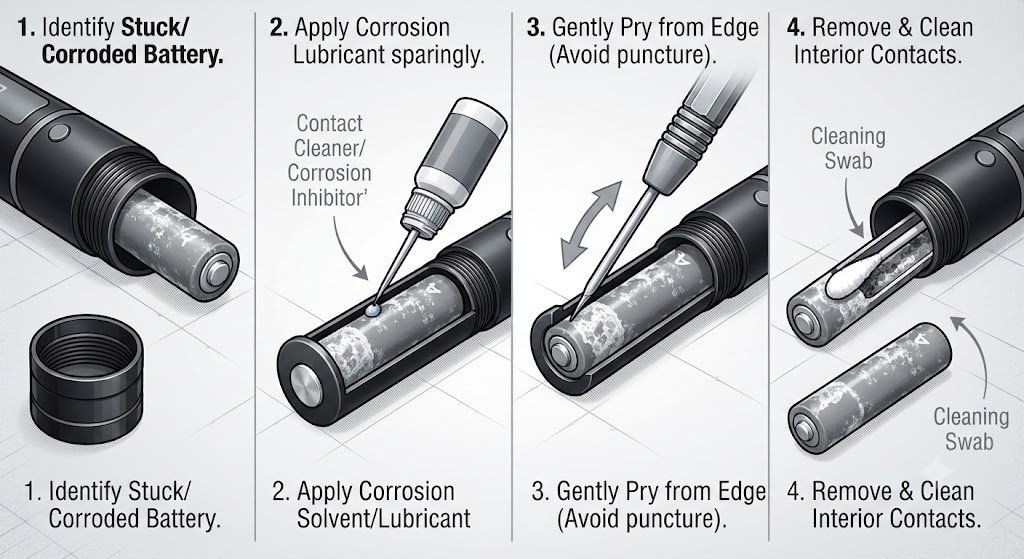
If you are trying to figure out how to unstick battery laser pointer with black and gray, resist the urge to immediately grab pliers, a screwdriver, or another sharp tool. A battery that refuses to slide out may simply be wedged against the tube, but it can also be stuck because of alkaline corrosion, leakage, damaged contacts, or physical swelling.
The black-and-gray exterior of the pointer does not determine the removal method. What matters much more is the battery chemistry, battery condition, and construction of the battery compartment.
This guide explains how to identify the problem, remove a stuck battery with the least aggressive method possible, clean the compartment, and recognize situations where attempting DIY removal is no longer worth the risk.
Quick Answer: How to Unstick Battery Laser Pointer With Black and Gray
For most ordinary pointers powered by removable AA or AAA alkaline batteries, start by turning the pointer off and removing the battery cap. Hold the open end downward over a container and try gentle tapping rather than forceful impacts.
If visible white corrosion is holding an alkaline battery in place, a very small amount of diluted vinegar applied with a cotton swab can help loosen alkaline residue. Duracell specifically recommends gloves and eye protection when cleaning battery leakage and lists a 50/50 mixture of diluted vinegar or lemon juice and water as an option for alkaline battery leakage.
Do not use the same approach automatically if the pointer contains a rechargeable lithium-ion battery. If a lithium cell appears swollen, damaged, unusually hot, or distorted, stop attempting to pry it out.
Why Does a Laser Pointer Battery Become Stuck?
Understanding the cause is the most important part of learning how to unstick battery laser pointer with black and gray. A battery normally slides into a cylindrical compartment with very little clearance, so even a small amount of corrosion or deformation can lock it inside.
Several problems are especially common.
1. Alkaline Battery Leakage and Corrosion
Old alkaline cells occasionally leak electrolyte, especially after being deeply discharged, exposed to unfavorable conditions, or left inside equipment for long periods. Energizer notes that factors such as charging non-rechargeable alkaline batteries, mixing chemistries, mixing fresh and used batteries, physical damage, high temperatures, and deep discharge can increase leakage risk.
The white powder commonly seen around leaking alkaline batteries is not simply ordinary dirt. Panasonic explains that alkaline electrolyte primarily contains potassium hydroxide, while the familiar white crystalline material may contain potassium carbonate formed after the electrolyte reacts with carbon dioxide.
That buildup can effectively glue a battery to the inside wall or electrical contact.
2. Battery Swelling or Deformation
A battery can also become physically larger than the space around it. This is particularly important when troubleshooting how to unstick battery laser pointer with black and gray, because force is exactly what you do not want to use on a damaged cell.
Panasonic notes that gas can build inside over-discharged alkaline batteries and potentially contribute to rupture and leakage.
Rechargeable lithium cells deserve even more caution. Never puncture, crush, drill into, heat, or aggressively squeeze a suspicious lithium-ion battery.
3. A Tight Battery Tube
Sometimes nothing has leaked.
Budget laser pointers can have narrow battery tubes with small manufacturing tolerances. A slightly damaged battery wrapper, dented tube, dirty compartment, or battery that is marginally wider than expected may become mechanically wedged.
4. Corroded Spring or Terminal
The battery itself may move slightly but remain attached to the terminal. Corrosion around the negative spring or positive contact can form a surprisingly strong bond.
That is why repeatedly shaking the pointer harder is not necessarily the solution.
What You Need Before Starting
Before attempting how to unstick battery laser pointer with black and gray, prepare a simple workspace.
Useful items include:
- Protective gloves
- Safety glasses
- Cotton swabs
- Paper towels
- A plastic or wooden tool
- Small plastic container
- Diluted white vinegar for confirmed alkaline leakage
- Clean water for lightly dampening cleanup swabs
- Isopropyl alcohol for final electronic-contact cleanup where appropriate
- A flashlight for inspecting the compartment
Work somewhere with good lighting and ventilation.
Duracell recommends both gloves and glasses when dealing with battery leakage. Panasonic likewise warns that leaked alkaline electrolyte can damage skin and eyes because it contains strongly alkaline potassium hydroxide.
How to Unstick Battery Laser Pointer With Black and Gray Step by Step
Start with methods that place the least stress on both the battery and laser pointer.
Escalate only when necessary.
Step 1: Turn the Laser Pointer Off
Before touching the battery compartment, make sure the pointer is switched off.
Keep the front of the laser pointed away from your face and anyone nearby. The FDA warns that laser pointers should never be aimed at people or directly into anyone’s eyes.
If the pointer has a safety lock, engage it.
Step 2: Remove the Battery Cap Completely
Unscrew the rear battery cap and place it aside.
Look carefully into the battery tube. Determine whether you can see:
- White powder
- Green or blue corrosion
- Brown residue
- Rust
- Liquid
- Torn battery wrapping
- A bulged battery
- A normal-looking battery that simply will not slide
This inspection determines what you should do next.
Step 3: Try Gravity First
The safest first attempt for how to unstick battery laser pointer with black and gray is also the simplest.
Hold the pointer with the open battery compartment facing downward over a plastic container. Give the body several controlled taps using your hand.
Do not violently swing the laser pointer.
The goal is to break a weak mechanical bond rather than turn the battery into a projectile.
Step 4: Try Gentle Tapping
If gravity does nothing, lightly tap the side of the laser body while keeping the opening pointed downward.
Use your palm or another forgiving surface instead of striking the device against concrete or metal.
A slightly jammed battery may gradually move toward the opening.
If you notice any movement, continue slowly rather than suddenly increasing force.
Step 5: Grip an Exposed Battery Without Damaging It
If several millimeters of the battery are sticking out, you may be able to pull it straight outward.
A piece of strong tape folded into a pull tab can sometimes provide enough grip without damaging the battery casing. A rubberized gripping material may also help.
If you use pliers on a conventional alkaline cell, use extremely light pressure and only when there is enough exposed surface to grip safely.
Never crush the battery.
Avoid allowing a metal tool to bridge electrical contacts or touch exposed positive and negative conductive areas simultaneously.
How to Unstick Battery Laser Pointer With Black and Gray When Corrosion Is Visible
This situation requires a different technique.
If you have confirmed that the stuck battery is an ordinary alkaline AA or AAA cell, white alkaline corrosion may be holding it against the tube.
Apply Diluted Vinegar Carefully
Instead of pouring liquid into the pointer, dampen a cotton swab with a small amount of 50/50 diluted white vinegar and water.
Touch the damp swab to accessible corrosion around the battery edge.
Duracell recommends diluted vinegar or lemon juice for cleaning leakage from alkaline batteries and advises allowing the electronic device to dry completely before installing another battery.
Use as little liquid as possible.
A laser pointer contains electrical components farther inside the housing, so flooding the tube could create another problem even if it loosens the corrosion.
Let the Residue Soften
Give the dampened corrosion a little time to react.
Then try the gravity and gentle-tapping method again.
Repeat with another lightly dampened cotton swab if visible corrosion remains. You are trying to loosen the material surrounding the battery rather than soak the entire device.
Clean Around the Battery Edge
If there is enough clearance, use a wooden toothpick or non-metallic tool to gently remove softened residue around the perimeter.
Never push the tool into the battery casing.
Once the bond breaks, turn the pointer opening downward and allow the battery to slide out rather than violently pulling it.
What If There Is No Visible Battery Corrosion?
If you search for how to unstick battery laser pointer with black and gray but find a perfectly clean battery compartment, the problem may be mechanical.
Inspect the exposed battery wrapper.
A torn plastic label can catch against the internal wall. Dirt, adhesive, or damage to the laser’s aluminum tube can also reduce clearance.
If the opposite end of the battery compartment is designed by the manufacturer to be opened, removing that section may provide another way to push the battery outward with a wooden or plastic rod.
Do not dismantle the laser module itself just to reach the battery.
Optical assemblies can contain delicate lenses, springs, drivers, and electrical connections that are easily damaged.
Special Warning for Rechargeable Lithium Batteries
This is one of the most important points in any guide covering how to unstick battery laser pointer with black and gray.
Some larger laser pointers use rechargeable cylindrical cells rather than AAA alkaline batteries. You might see labels such as 16340, 18650, or Li-ion printed on the cell.
If you see any of the following warning signs, stop:
- Battery casing is swollen
- Wrapper is split
- Cell is leaking
- Cell becomes hot
- There is a chemical smell
- Battery has been punctured
- Terminal looks badly damaged
- Laser became unusually hot before failing
Do not drill a screw into the battery.
Do not puncture it with a screwdriver.
Do not heat the pointer to expand the tube.
Do not place it in a freezer hoping the battery will shrink.
Do not crush the battery with locking pliers.
With an uncertain or damaged rechargeable cell, professional removal is a much better option than escalating force.
Methods You Should Avoid
Search results and online forums sometimes suggest aggressive tricks for how to unstick battery laser pointer with black and gray. Some may work mechanically while creating unnecessary battery risk.
Never Drill Into the Battery
Drilling a pilot hole and inserting a screw sounds convenient because it creates a pulling handle.
It also intentionally penetrates the battery casing.
That is a poor approach when the cell chemistry and internal condition are uncertain. A damaged rechargeable lithium battery can present a serious fire hazard, while leaked alkaline electrolyte can cause chemical injury.
Don’t Hammer the Pointer
Heavy impacts can damage:
- The battery
- Laser driver
- Lens assembly
- Switch
- Electrical contacts
- Threads
- Aluminum housing
Controlled tapping and hammering are not the same thing.
Don’t Use Heat
Heating a battery-containing tube to expand the housing introduces unnecessary risk.
Panasonic’s alkaline safety information warns against excessive heat, and battery manufacturers generally recommend normal room-temperature storage rather than exposing cells to extreme temperatures.
Don’t Flood the Tube With Chemicals
Vinegar can be useful for confirmed alkaline corrosion.
That does not mean you should fill the laser pointer with it.
Electronic circuits, switches, solder connections, springs, coatings, and optical components may all be damaged by excessive liquid.
How to Clean the Laser Pointer After Removing the Battery
Knowing how to unstick battery laser pointer with black and gray is only half the repair.
The residue that caused the battery to stick may still prevent the new battery from making electrical contact.
Remove Loose Material
Wear gloves and eye protection.
Use a cotton swab or small brush to remove loose residue from the accessible battery compartment.
Clean Alkaline Leakage
For confirmed alkaline leakage, use a lightly dampened cotton swab with the recommended diluted vinegar solution.
Concentrate on corroded contacts and the inside wall.
Avoid pushing debris deeper into the device.
Finish the Contacts
After the corrosion has been removed, carefully wipe accessible surfaces clean.
A small amount of isopropyl alcohol on a swab can help displace remaining moisture and remove grime from metal contacts, provided it is compatible with the device.
Let everything dry completely before installing another battery.
Inspect the Spring
Look at the battery spring or terminal.
If it is heavily rusted, partially dissolved, loose, or broken, the pointer may still fail even after the stuck battery has been removed.
At that point, replacing the contact or the entire pointer may make more sense.
The Black-and-Gray Color Does Not Identify the Battery Type
An important clarification when researching how to unstick battery laser pointer with black and gray is that exterior color is not a reliable model identifier.
Many unrelated laser pointers use essentially identical black, silver, and gray cylindrical housings.
Instead, look for:
- Manufacturer name
- Model number
- Laser classification label
- Voltage marking
- Battery designation
- Polarity diagram
- Original packaging
- User manual
Never guess battery voltage based purely on physical size.
Two cylindrical cells that look similar can use different chemistries and voltages. Follow the manufacturer’s specification printed on the device or documented in its manual.
When Should You Stop Trying?
DIY methods for how to unstick battery laser pointer with black and gray make sense when you have an inexpensive device with a normal alkaline battery held by light corrosion.
They make less sense when significant damage is visible.
Stop and consider professional repair or replacement if:
- The battery is badly swollen.
- You cannot identify the battery chemistry.
- The cell is physically damaged.
- A rechargeable lithium cell is jammed tightly.
- Corrosion extends deep into the electronics.
- The battery compartment has deformed.
- Removal would require puncturing the battery.
- The pointer becomes hot.
- The device contains an expensive laser module worth protecting.
A cheap pointer is rarely worth risking an injured hand, eye damage, damaged furniture, or a battery fire.
How to Prevent a Laser Pointer Battery From Getting Stuck Again
Once you know how to unstick battery laser pointer with black and gray, prevention is straightforward.
Battery manufacturers consistently recommend removing exhausted batteries promptly and taking batteries out of equipment that will sit unused for extended periods. Duracell also advises against mixing different brands, battery types, or old and new batteries within the same device.
Follow these habits:
- Remove batteries during long-term storage.
- Replace depleted batteries promptly.
- Use the exact battery type specified by the manufacturer.
- Never mix fresh and partially discharged cells.
- Never mix different battery chemistries.
- Keep the pointer dry.
- Store it at ordinary room temperature.
- Check the compartment periodically for corrosion.
- Do not recharge batteries unless they are specifically designed to be rechargeable.
- Install cells using the polarity markings shown on the device.
These small precautions can save the entire laser pointer.
Troubleshooting After the Battery Comes Out
Sometimes how to unstick battery laser pointer with black and gray turns into a second question: why does the pointer still not work?
First inspect the contacts.
Corrosion can create electrical resistance even when the battery tube looks relatively clean. The spring should remain metallic and firmly attached rather than appearing brittle or heavily eaten away.
Then install the correct new battery, checking the polarity printed on the pointer.
Do not repeatedly experiment with different battery voltages hoping one will make the laser work. Incorrect voltage can damage the driver circuitry.
When testing the pointer, aim it only at a safe, non-reflective surface and keep the beam away from people’s eyes. The FDA emphasizes that brightness alone does not reliably indicate a laser’s power or eye hazard.
FAQ About How to Unstick Battery Laser Pointer With Black and Gray
1. What is the easiest way to get a stuck battery out of a laser pointer?
The safest first method for how to unstick battery laser pointer with black and gray is gravity combined with gentle tapping. Remove the cap, hold the compartment opening downward over a container, and tap the pointer lightly with your hand.
If the battery does not move, inspect it before applying more force. Visible white residue usually points toward alkaline leakage, while deformation or bulging means you should be much more cautious.
2. Can I use vinegar to remove a stuck laser pointer battery?
Yes, but only in the appropriate situation.
For a confirmed leaking alkaline battery, diluted vinegar can help clean and loosen alkaline residue. Duracell recommends a diluted vinegar or lemon-juice solution for cleaning leakage from alkaline batteries.
Apply a small amount with a cotton swab instead of filling the battery tube.
Do not automatically use vinegar on an unidentified or damaged rechargeable lithium cell.
3. Why is white powder coming from the battery?
When learning how to unstick battery laser pointer with black and gray, white residue is a strong clue that an alkaline battery has leaked.
Panasonic explains that alkaline batteries contain potassium-hydroxide electrolyte and that white crystalline material appearing after leakage can include potassium carbonate produced through reaction with carbon dioxide.
Wear gloves and eye protection while handling it.
4. Can I drill into a battery to pull it out?
No.
Although drilling into a stuck battery is sometimes suggested online, deliberately puncturing a cell is an unnecessarily hazardous removal technique. This becomes particularly concerning when you do not know whether the pointer contains an alkaline cell or rechargeable lithium battery.
Try non-destructive extraction methods first. If the battery cannot be removed without puncturing, crushing, or heating it, professional help or replacement of the device is the better choice.
5. Should I replace the laser pointer after a battery leak?
Not necessarily.
After following how to unstick battery laser pointer with black and gray, inspect the internal contacts carefully. Light surface corrosion may be cleanable, and the pointer may work normally once the compartment is dry and fitted with the correct fresh battery.
Severe corrosion is different. If contacts have broken, circuitry has been reached by leakage, the housing is damaged, or a lithium cell has become physically compromised, replacing the device may be safer and cheaper than attempting extensive repairs.
Conclusion
The safest approach to how to unstick battery laser pointer with black and gray is to diagnose before applying force. Start with gravity and gentle tapping, inspect for corrosion, and use a tiny amount of diluted vinegar only when you have confirmed ordinary alkaline leakage.
Avoid the dramatic techniques. No drilling. No puncturing. No heating. No crushing. Treat swollen or damaged rechargeable lithium cells as a reason to stop rather than a challenge to use more force.
Once the old battery is removed, clean the compartment carefully, allow it to dry completely, inspect the electrical contacts, and install only the battery type and voltage specified by the manufacturer. Then remove batteries whenever the pointer will be stored for a long period.
That approach protects both the laser pointer and the person repairing it—and dramatically reduces the chance that the next battery becomes stuck in the first place.
