
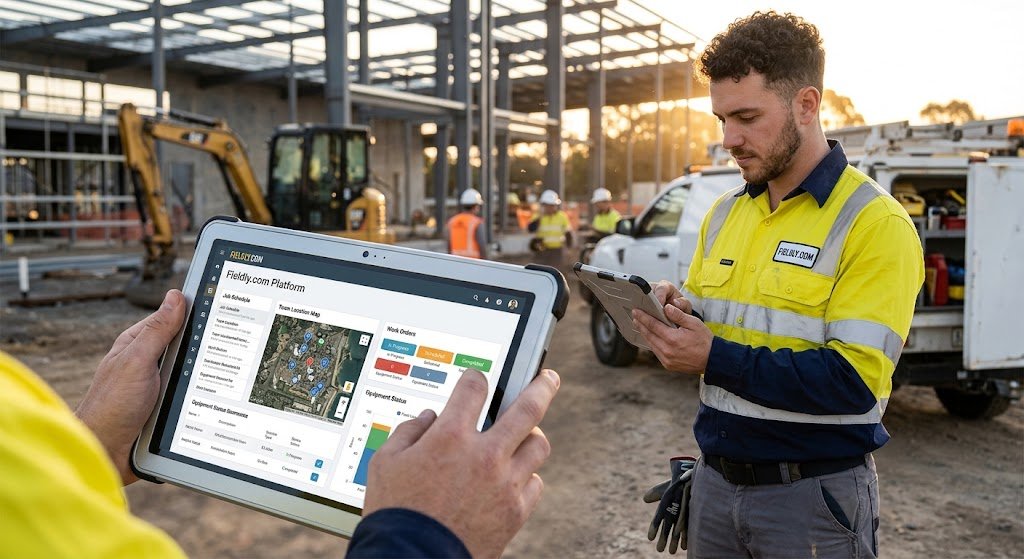
Managing construction projects involves far more than assigning tasks and monitoring deadlines. Companies must coordinate field workers, track labor costs, document materials, control expenses, and ensure every completed job contributes to profitability. Understanding fieldly.com platform features dashboards helps construction businesses discover how a centralized digital workspace can simplify these responsibilities while improving operational visibility.
Fieldly is a project management platform designed primarily for construction, installation, service, and contracting businesses. It connects office administration with on-site operations through digital work orders, mobile reporting, project monitoring, invoicing, and financial tracking. Instead of depending on disconnected spreadsheets and paper records, teams can manage essential project information within one system.
The real advantage is not simply having more information available. It is having the right information when decisions need to be made.
This guide explores the platform’s core capabilities, dashboard functionality, reporting tools, financial insights, practical workflows, and considerations for businesses evaluating digital field management software.
What Is Fieldly.com and How Does the Platform Work?
Fieldly is a cloud-based project management solution that connects administrative teams, project managers, and field employees.
Its primary purpose is to make everyday construction operations more transparent and manageable. Businesses can organize projects, distribute work orders, collect reports, and monitor project finances without constantly transferring information between separate systems.
According to Fieldly’s official website, its tools are designed for construction, installation, service, and related industries. The platform supports digital reporting, financial monitoring, and communication between field personnel and office staff.
Who Can Benefit From Fieldly?
The platform is particularly relevant to businesses that perform project-based or location-based work, including:
-
Construction contractors: Manage multiple projects, labor reports, and expenses.
-
Electrical installation companies: Organize work orders, materials, and field documentation.
-
Plumbing and HVAC businesses: Track service activities, employee hours, and job costs.
-
Property maintenance teams: Coordinate recurring work and document completed services.
-
Groundwork contractors: Record equipment, travel, and workforce activity.
-
Project administrators: Monitor financial performance and prepare reports.
Fieldly is especially useful when several employees contribute information to the same project. A centralized system reduces the need to manually reconcile reports from different people.
Fieldly.com Platform Features Dashboards: Key Capabilities Explained
The fieldly.com platform features dashboards experience centers on connecting operational activity with management information. Rather than treating project updates, employee reports, and financial records as unrelated tasks, Fieldly brings them into a shared workflow.
Its core functionality includes project management, work order administration, digital reporting, financial monitoring, checklists, invoicing, and integrations.
1. Centralized Project Management Dashboard


The project overview is one of Fieldly’s most important management features. It allows administrators to access project information, review related work orders, and locate operational records.
Instead of opening individual spreadsheets for every assignment, project managers can work from a common interface. This is particularly valuable for companies running several jobs simultaneously.
Key capabilities include:
-
Accessing projects and associated work orders.
-
Reviewing project information and related documentation.
-
Using filters to locate specific records.
-
Viewing updated information from field operations.
-
Accessing reports and checklists associated with projects.
Fieldly confirms that its web application provides project and work-order overviews with real-time updates and filtering tools.
Practical example: A contractor managing six renovation projects can use project records to investigate which assignments have received recent time reports, which require documentation, and which need closer financial attention.
The benefit is straightforward: fewer administrative blind spots.
2. Real-Time Project Monitoring
Construction profitability can change quickly. Unexpected labor hours, additional materials, and project modifications may turn a profitable assignment into an expensive one.
Fieldly’s project monitoring tools help businesses review operational and financial information as reports are submitted.
The monitoring functionality supports information such as:
-
Reported working hours.
-
Travel and expense records.
-
Material-related costs.
-
Project financial information.
-
Invoiced amounts over selected periods.
-
Reports filtered by employee, project, customer, or time frame.
These features help managers understand where costs are accumulating and which projects deserve closer attention.
An important distinction: Real-time visibility does not automatically guarantee accurate financial results. Dashboard information is only as reliable as the underlying reports, cost rates, and accounting records.
Businesses should therefore establish consistent reporting practices before relying on project figures for important financial decisions.
3. Digital Work Order Management
Work orders connect planned assignments with actual field activity.
A properly organized work order should explain what needs to be completed, who is responsible, and which project the work belongs to. Fieldly supports distributing work orders and keeping relevant information accessible to employees.
Managers can use the platform to coordinate assignments, while field workers can review the information needed to complete their responsibilities.
This reduces problems caused by unclear instructions, misplaced paperwork, and disconnected communication.
4. Mobile Field Reporting
Fieldly’s mobile application extends project management beyond the office.
Employees can access assigned work and submit information from job sites, reducing the delay between completing an activity and documenting it.
Supported reporting activities include time, travel, expenses, materials, field reports, and checklists.
For companies with distributed teams, this creates a more reliable flow of information between workers and administrators.
Understanding the Different Fieldly Dashboard Functions
Not every dashboard serves the same purpose. Some views are designed to support daily operations, while others help managers evaluate project performance and costs.
Understanding these differences is essential when assessing fieldly.com platform features dashboards for a growing business.
| Dashboard or management view | Main purpose | Business value |
|---|---|---|
| Project overview | Organize projects and work orders | Better operational coordination |
| Project monitoring | Review project costs and invoicing | Improved financial visibility |
| Time reporting overview | Review employee working hours | Stronger labor control |
| Reporting and filtering | Analyze selected project records | Faster information retrieval |
| Field reports | Review site documentation | Better accountability |
| Invoicing workflow | Convert reported work into invoices | Reduced billing administration |
These categories describe Fieldly’s documented capabilities and practical management uses. They should not be interpreted as six separately branded dashboard modules.
Operational Visibility Versus Financial Visibility
Operational visibility answers questions such as whether work has been assigned, which activities have been reported, and what documentation is available.
Financial visibility focuses on costs, invoice amounts, and project performance.
A business needs both perspectives. A project may be progressing according to schedule while consuming more labor than expected.
Reviewing operational and financial information together helps managers identify problems that would otherwise remain hidden.
How Fieldly.com Platform Features Dashboards Improve Financial Management
Financial management is often where construction businesses experience their greatest operational challenges. Labor costs increase, material prices fluctuate, and additional work may not be documented correctly.
The fieldly.com platform features dashboards approach helps address these problems by connecting reported project activity with financial monitoring.
Project Cost Tracking and Profitability Analysis
Fieldly collects financial information from project reports, supplier invoices, and integrated purchasing records. This provides managers with a more complete view of the costs associated with individual assignments.
For example, consider a construction project with the following financial figures:
| Financial metric | Example amount |
|---|---|
| Contract value | $50,000 |
| Labor costs | $18,000 |
| Material costs | $12,000 |
| Equipment and travel | $3,000 |
| Subcontractor costs | $5,000 |
| Total recorded costs | $38,000 |
| Remaining amount before other expenses | $12,000 |
In this hypothetical example, the project has a 24% margin before additional overhead, taxes, and other unrecorded expenses.
The calculation is simple, but the underlying information must be complete. Missing supplier invoices or unreported employee hours can produce a misleading result.
Useful management practice: Compare recorded costs against the project budget every week, rather than waiting until the final invoice has been issued.
Invoicing Based on Actual Work
One of Fieldly’s practical strengths is its connection between field reporting and invoicing.
Employees can record working hours, materials, travel, and related expenses. Administrators can then use this information to prepare invoices without manually reconstructing every job’s history.
Fieldly also supports sending invoices through its web application and connecting invoicing workflows with compatible accounting software.
This can help reduce overlooked billable items, particularly for businesses that perform frequent service visits or additional work.
Managing Supplier Invoices
Material purchasing introduces another layer of complexity.
An installation company might order supplies from several wholesalers, receive invoices at different times, and distribute materials across multiple projects.
Fieldly supports supplier invoice management and electronic data interchange (EDI) integrations that help associate purchasing information with the appropriate projects.
This connection is important because material costs are often recorded after work has already started. Better purchasing visibility helps managers detect expenses that have not yet been reflected in project calculations.
Advanced Reporting and Data Analysis
Reliable reporting turns everyday activity into useful management information.
The fieldly.com platform features dashboards ecosystem includes filtering, reporting overviews, and export functionality that can support more detailed analysis.
Employee Time Reporting
Labor is a major expense for many contractors. Understanding how much time employees spend on particular assignments is essential for estimating future projects and evaluating current costs.
Fieldly supports digital time reporting through its mobile application. Managers can review reported hours across employees and selected periods.
Employees can record work directly against relevant assignments, helping reduce confusion over which project should carry the labor cost.
The resulting information can support payroll preparation, project monitoring, and internal performance reviews.
Exporting Reports to Excel and PDF
Fieldly’s project monitoring tools support exporting filtered reports to Excel or PDF. This gives businesses additional flexibility when information needs to be reviewed outside the application.
Excel exports are particularly useful for calculations, reconciliation, and management analysis.
PDF exports can be useful for presenting selected information to customers, stakeholders, or internal decision-makers.
Which Performance Indicators Should Businesses Track?
Having access to reports is not enough. Companies should establish a small set of performance indicators that directly support business decisions.
| KPI | What it measures | Why it matters |
|---|---|---|
| Labor cost variance | Actual labor cost compared with budget | Identifies inefficient or underestimated work |
| Project gross margin | Revenue remaining after direct costs | Measures project profitability |
| Billable hours ratio | Billable hours divided by total hours | Highlights labor utilization |
| Unbilled work value | Completed work not yet invoiced | Reveals delayed revenue |
| Material cost variance | Actual materials compared with estimates | Helps control purchasing expenses |
| Reporting completion rate | Required reports submitted on time | Indicates data reliability |
These are recommended management metrics, not a claim that Fieldly automatically displays every KPI as a built-in dashboard widget.
Some calculations may require exporting information or combining Fieldly data with accounting records.
Custom Checklists and Quality Control
Construction work often requires inspections, safety documentation, and quality assurance records.
Paper-based checklists can become difficult to manage when employees work across multiple locations. Documents may be misplaced, submitted late, or completed inconsistently.
Fieldly includes a drag-and-drop checklist builder that allows businesses to create customized digital forms.
What Can Businesses Include in Checklists?
Depending on the task, companies can use checklists for:
-
Site inspections and quality checks.
-
Safety assessments and risk documentation.
-
Installation verification.
-
Equipment inspection records.
-
Customer handover procedures.
-
Completion confirmations and signatures.
Fieldly supports images, signatures, templates, and PDF exports within its checklist functionality.
Why Digital Documentation Matters
Consider an electrical contractor completing an installation.
A technician can document completed checks, attach supporting photographs, and submit the information digitally. Office staff can then review the documentation without waiting for physical paperwork.
This creates a clearer record of completed work and can make customer handovers more organized.
It is important, however, to distinguish documentation from regulatory compliance. Using a digital checklist does not automatically mean an installation meets applicable safety standards.
Change Order Management and Project Adjustments
Construction projects rarely proceed without changes.
Customers may request additional installations, unexpected site conditions may require extra labor, or materials may need to be replaced.
Without proper documentation, these changes can create disagreements about scope, cost, and payment.
Fieldly provides change order management functionality for documenting additional or modified work. It also supports separating change orders within a project’s structure and reviewing their associated financial information.
A Practical Change Order Workflow
A sensible workflow involves documenting the requested change, estimating the additional cost, obtaining the necessary approval, and associating the work with the correct project.
Once the work is completed, employees should record the relevant hours, materials, and expenses.
Managers can then review the additional costs and prepare the corresponding invoice.
The key benefit is traceability. A documented change is easier to explain, verify, and bill than an informal instruction communicated during a busy workday.
Fieldly Integrations With Accounting and Business Systems
A project management application becomes more valuable when it works with existing business software.
Fieldly offers integrations involving financial systems, payroll applications, and material suppliers.
Its official integration information lists systems such as Fortnox, Visma, Hogia, and Björn Lundén, alongside various supplier and payroll connections.
Accounting Integrations
Accounting integrations can help connect project information with financial administration.
Depending on the integration, relevant data may include customers, supplier invoices, invoicing records, and other business information.
Businesses should verify the exact data synchronization supported by their selected accounting system before implementation.
Payroll Integrations
Time reporting and payroll are closely related.
When employee hours are recorded digitally, payroll administrators may be able to prepare salary information with less manual re-entry.
Fieldly supports payroll-related exports and integrations, although the available functionality depends on the connected system and configuration.
Supplier and EDI Integrations
For electrical and plumbing companies, supplier connectivity can be especially valuable.
Purchase information can be linked to projects, helping businesses account for materials and avoid overlooking billable expenses.
Before adopting any integration, companies should check regional availability, supported software versions, licensing requirements, and any additional costs.
How to Get the Most From Fieldly.com Platform Features Dashboards
Implementing software does not automatically improve a business. The results depend on how consistently employees use the system and how clearly management defines its workflows.
The following approach can help companies turn fieldly.com platform features dashboards into a practical operational resource.
Step 1: Establish a Consistent Project Structure
Begin by organizing projects according to how the business actually operates.
Fieldly supports main projects and subprojects, allowing companies to separate different sections of work while maintaining an overall project structure.
Use consistent naming conventions, customer references, and project classifications. This makes filtering and reporting easier as the number of assignments grows.
Step 2: Define Reporting Responsibilities
Decide who must report working hours, materials, travel, and other expenses.
Employees should understand when reports must be submitted and which project or work order they belong to.
For example, a company might require field reports to be completed before the end of each working day.
Consistent reporting is more valuable than collecting large amounts of incomplete information.
Step 3: Review Financial Information Weekly
Managers should establish a recurring financial review.
During each review, examine project costs, reported labor, supplier expenses, and invoicing progress.
Pay particular attention to projects where costs are increasing faster than expected.
Step 4: Standardize Quality Documentation
Create reusable checklists for recurring work.
A plumbing company might use different templates for inspections, installation completion, and maintenance visits.
Standardization improves consistency and reduces the chance of forgetting essential documentation.
Step 5: Monitor Reporting Quality
Dashboard reliability depends on reporting discipline.
Managers should regularly check for missing hours, incorrectly assigned expenses, duplicate entries, and incomplete work records.
Fixing these issues early helps prevent inaccurate invoices and misleading financial summaries.
Common Mistakes to Avoid When Using Fieldly Dashboards
Even well-designed software can produce disappointing results when workflows are poorly organized.
One common mistake is treating the dashboard as a passive reporting screen. Managers may review information occasionally without using it to make operational changes.
Another problem is inconsistent data entry. If some employees submit reports daily while others wait until the end of the month, project information becomes less reliable.
Businesses should also avoid assuming that every financial metric represents final accounting profit. Project cost views may not include all overhead, tax adjustments, or expenses recorded elsewhere.
Finally, companies should not enable every available feature immediately. Introducing project management, time reporting, checklists, and invoicing in manageable stages can make adoption easier.
Fieldly.com Platform Features Dashboards: Benefits and Limitations
A balanced evaluation should consider both operational advantages and potential implementation challenges.
| Advantages | Considerations |
|---|---|
| Centralized project and work order information | Requires consistent employee adoption |
| Digital time and expense reporting | Incorrect inputs can affect financial accuracy |
| Project cost monitoring | Not every advanced KPI is necessarily built in |
| Mobile field documentation | Workers need suitable device access |
| Customizable checklists | Templates require initial setup |
| Accounting and supplier integrations | Compatibility varies by system |
| PDF and Excel report exports | Some analysis may require external tools |
Fieldly is primarily designed around construction and field operations. Businesses seeking a general-purpose marketing dashboard, advanced customer analytics platform, or standalone business intelligence suite may need a different solution.
The right choice depends on operational requirements rather than the number of advertised features.
How Does Fieldly Compare With Traditional Project Management Methods?
Traditional construction administration often relies on spreadsheets, email, messaging applications, and printed documents.
These tools can work for small operations, but coordination becomes more difficult as projects and employees increase.
A centralized field management system reduces the number of places where essential information is stored.
For example, a project manager may no longer need to collect employee timesheets separately, search email conversations for site photographs, and manually match supplier invoices against individual projects.
Fieldly’s value comes from connecting these activities.
However, businesses should still evaluate implementation costs, training requirements, data migration, and compatibility with their existing financial systems.
A small company with only occasional projects may have different needs from a contractor managing dozens of active work orders.
How to Evaluate Fieldly Before Purchasing
Before committing to the platform, businesses should test realistic workflows rather than relying entirely on product demonstrations.
A useful evaluation might involve creating a sample project, assigning work orders, submitting time reports, adding material expenses, and reviewing the resulting project information.
Managers should also test report exports and any accounting integrations they expect to use.
Ask the software provider to demonstrate how a project moves from quotation to work order, reporting, financial monitoring, and invoicing.
This reveals whether the system fits actual business processes.
Questions Worth Asking During a Demo
-
Can our existing project and customer information be imported?
-
Which reporting features are included in the proposed subscription?
-
How are employee permissions managed?
-
Can our accounting and payroll systems connect directly?
-
Which costs appear in project financial overviews?
-
What training and implementation support is available?
-
How can we export our records if we change platforms?
These questions are particularly important when evaluating fieldly.com platform features dashboards for long-term business use.
Frequently Asked Questions About Fieldly.com Platform Features Dashboards
1. What are the main features of Fieldly.com dashboards?
Fieldly provides project and work order overviews, project monitoring, employee time reporting, field documentation, financial information, and filtering capabilities.
The platform also includes invoicing workflows, digital checklists, change order management, and integrations with compatible financial and supplier systems.
Its strongest use case is connecting information submitted by field workers with the operational and financial information required by office administrators.
2. Can Fieldly track project costs and profitability in real time?
Yes. Fieldly’s project monitoring functionality provides access to financial information based on reported work, expenses, supplier invoices, and other relevant project records.
Managers can use this information to examine project costs and invoicing over selected periods.
However, real-time project monitoring should not be confused with a complete audited profit calculation. Accurate results depend on timely reporting, correct cost allocation, and the completeness of connected financial records.
3. Does Fieldly support mobile access for construction workers?
Yes. Fieldly provides a mobile application designed for employees working in the field.
Workers can access assigned jobs, review relevant information, submit time reports, and create documentation with photographs and comments.
This makes it easier to share project information with office personnel without relying on paper forms or separate communication channels.
4. Can Fieldly integrate with accounting software?
Yes. Fieldly supports integrations with several accounting and business systems, including products from Fortnox, Visma, Hogia, and other providers.
These connections can support workflows involving invoicing, project information, supplier records, and payroll-related data.
The exact capabilities vary by integration. Businesses should confirm compatibility with their specific accounting software and subscription before purchasing.
5. Is Fieldly suitable for small construction businesses?
Fieldly can be relevant to small construction and installation businesses, particularly those managing multiple jobs, employees, or recurring reporting requirements.
Its digital work orders, mobile reporting, and invoicing functionality may help reduce administrative work as operations grow.
However, smaller companies should compare subscription costs, setup requirements, and actual feature needs. A focused implementation may be more practical than adopting every available function immediately.
Conclusion: Is Fieldly Worth Considering for Construction Management?
The fieldly.com platform features dashboards ecosystem offers a structured way to manage construction projects, coordinate field operations, monitor costs, and organize essential business information.
Its strongest capabilities lie in connecting project administration with everyday reporting. Time records, materials, work orders, financial information, and field documentation can become part of a more consistent workflow.
For contractors, installation companies, and service businesses, this can mean better visibility into ongoing work and fewer opportunities for important information to be overlooked.
The next step is to evaluate the platform against your actual operational needs.
Visit the official Fieldly website, review its project monitoring and reporting functionality, and request a demonstration using a realistic project from your business. Focus on how accurately the platform captures costs, how easily employees submit reports, and whether the resulting information supports better management decisions.
A useful dashboard should do more than display project data. It should help your team recognize problems earlier, manage resources more effectively, and make decisions with greater confidence.
