
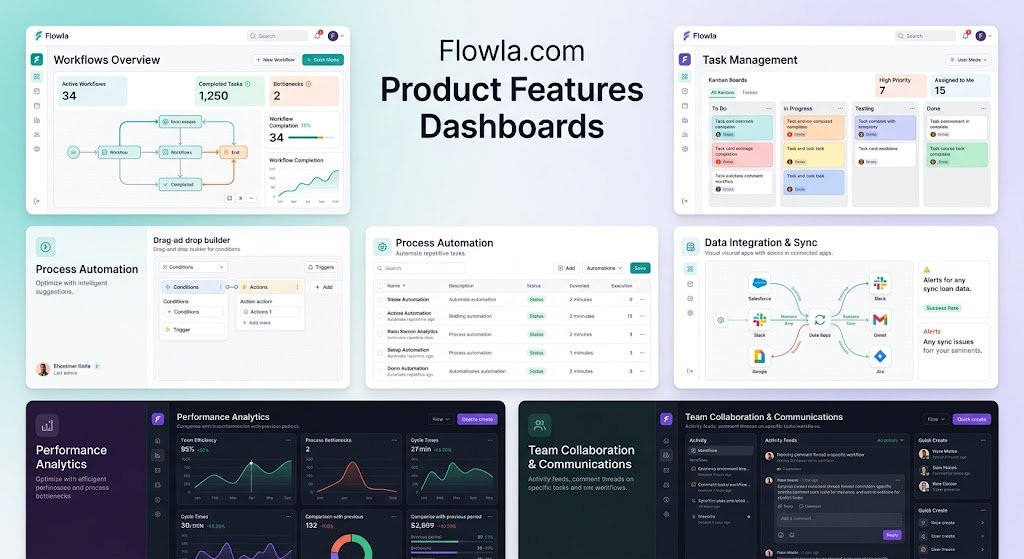
Managing a modern B2B sales pipeline requires more than tracking contacts, updating spreadsheets, and reviewing revenue forecasts. Sales teams need to understand buyer behavior, identify stalled opportunities, coordinate stakeholders, and take action before promising deals lose momentum. That’s where flowla.com product features dashboards become particularly relevant, combining sales intelligence, customer collaboration, and workflow visibility in a connected revenue platform.
Flowla is a sales and customer success platform designed to bring buyer interactions, deal information, shared resources, and next steps into a more organized environment. Its capabilities extend beyond conventional reporting, incorporating digital sales rooms, mutual action plans, engagement analytics, and AI-assisted revenue execution.
For revenue leaders, account executives, sales operations specialists, and customer success managers, the value lies in connecting information with action. Instead of simply discovering that a deal has stalled, teams can investigate engagement patterns, identify outstanding tasks, and determine what should happen next.
This guide examines Flowla’s dashboard capabilities, core product features, practical use cases, implementation strategies, and limitations. It also explains how to evaluate whether the platform fits your organization’s sales and post-sale processes.
What Is Flowla.com and How Does Its Dashboard System Work?
Flowla is a B2B revenue execution platform that supports sales teams and customer success organizations throughout the customer lifecycle. Its platform connects customer-facing collaboration spaces with internal deal intelligence, helping teams manage opportunities from initial engagement through onboarding and renewals.
According to Flowla’s official platform overview, the company’s current positioning centers on four connected capabilities: enablement, collaboration, intelligence, and AI-supported execution. Its AI system, REX, is designed to analyze deal information and recommend or perform relevant next actions.
Understanding the Dashboard Architecture
The flowla.com product features dashboards experience is best understood as several connected views rather than a single collection of charts.
These views support different operational questions:
-
Deal intelligence: What is happening with an opportunity, and what could put it at risk?
-
Buyer engagement: Which stakeholders are reviewing shared content and participating in the process?
-
Team insights: Where might representatives need support, coaching, or follow-up?
-
Action plan progress: Which milestones are complete, overdue, or waiting for customer input?
-
Customer success tracking: Are onboarding and account-related activities progressing as expected?
Together, these capabilities give revenue teams a clearer understanding of customer activity and operational progress.
How Flowla Differs From a Traditional CRM Dashboard
A conventional customer relationship management dashboard typically emphasizes structured records, including deal values, pipeline stages, expected close dates, and sales activities.
Flowla adds a collaborative layer that captures how buyers interact with shared deal rooms, documents, action plans, and related resources.
For example, a CRM may show that a $40,000 opportunity is in the proposal stage. Flowla can provide additional context about which stakeholders are engaging with the proposal and whether the agreed next steps are progressing.
The distinction matters because CRM stage data describes a deal’s recorded status, while buyer engagement data provides evidence about the activity surrounding it.
Neither source is sufficient on its own. Combining them can produce a more useful picture of deal health.
Key Flowla.com Product Features Dashboards for Revenue Teams
Flowla offers several reporting and operational capabilities designed to address specific challenges throughout the sales cycle.
Its official product overview highlights stakeholder identification, buyer engagement, and team insights as core reporting areas. These features are intended to help teams understand what buyers are doing, where opportunities stand, and how representatives can respond.
1. Buyer Engagement Dashboard
Buyer engagement analytics help sales representatives understand how prospects interact with shared sales materials.
Rather than relying entirely on email replies or meeting attendance, representatives can examine activity inside digital sales rooms.
Relevant engagement indicators include:
-
Visits to shared deal rooms.
-
Documents and resources viewed.
-
Time spent reviewing particular materials.
-
Participation from additional stakeholders.
-
Comments and interactions with shared content.
-
Changes in activity across the buying process.
These signals can help representatives prioritize follow-up conversations.
Suppose a prospect has been relatively quiet for two weeks but suddenly revisits a technical implementation document. That activity could indicate renewed interest, internal evaluation, or a new stakeholder reviewing requirements.
It does not automatically mean the deal will close. The appropriate response is to investigate the context and offer useful assistance rather than assume purchase intent.
2. Deal Intelligence and Pipeline Visibility
The deal intelligence capability provides a more comprehensive view of individual opportunities by bringing together information from connected sources.
Flowla describes its system as combining CRM records, communications, calls, and deal-room activity to identify potential risks and suggest next steps.
This helps sales managers move beyond manually reviewing every opportunity during pipeline meetings.
For example, managers can investigate whether an opportunity has:
-
Incomplete stakeholder coverage.
-
Outstanding buyer commitments.
-
Reduced engagement.
-
Unresolved purchasing objections.
-
Missing qualification information.
-
Delayed approval milestones.
The primary benefit is prioritization. Representatives can focus on opportunities requiring meaningful action rather than spending equal time on every deal.
3. Mutual Action Plan Dashboard
Mutual action plans are collaborative roadmaps that define what sellers and buyers must accomplish to complete a shared objective.
Flowla supports task ownership, deadlines, progress tracking, reminders, and collaborative action management. Its product documentation also describes timeline, Gantt-style, and Kanban views for monitoring activities.
A typical action plan might contain:
| Milestone | Responsible Party | Expected Outcome |
|---|---|---|
| Product evaluation | Buyer and sales team | Requirements confirmed |
| Technical validation | IT team | Integration feasibility reviewed |
| Security assessment | Buyer security team | Security approval |
| Commercial review | Procurement | Pricing and terms accepted |
| Contract execution | Authorized signatories | Agreement completed |
| Implementation kickoff | Customer success | Onboarding initiated |
This structure gives both parties a shared understanding of responsibilities.
When tasks remain incomplete, teams can identify the blocker and address it before the expected completion date is affected.
4. Customer Onboarding and Account Management Dashboard
Revenue management does not end when a contract is signed.
Customer success teams must coordinate implementation, training, stakeholder communication, adoption milestones, and ongoing account activities.
Flowla’s client portal capabilities support centralized resources, shared plans, progress tracking, and customer collaboration. The company also describes dashboard views that help identify processes requiring attention.
This is particularly useful for organizations managing complex implementations involving several departments.
A customer success manager can review incomplete onboarding milestones, identify delayed customer actions, and determine whether additional support is needed.
For customers, a shared portal reduces the need to search through disconnected emails for documents and instructions.
5. Team Insights and Sales Performance Visibility
The flowla.com product features dashboards also support managers who need to understand how teams execute sales processes.
Flowla’s reporting capabilities include team insights, while its broader platform incorporates coaching and enablement functionality.
These features can support questions such as whether representatives consistently share appropriate resources, maintain stakeholder engagement, and follow established sales processes.
Managers should distinguish between activity measurements and actual performance.
A representative generating many document views is not necessarily more effective than someone producing fewer interactions but stronger customer outcomes.
For meaningful performance analysis, engagement signals should be reviewed alongside CRM conversion data, deal progression, and customer feedback.
Digital Sales Rooms: The Foundation of Flowla’s Buyer Experience
Digital sales rooms are central to how Flowla organizes customer-facing interactions.
A digital sales room is a shared online workspace where buyers and sellers can access relevant materials, review next steps, and collaborate throughout the purchasing process.
Instead of distributing proposal files, meeting recordings, pricing information, and implementation documents across separate email conversations, a team can organize them in one accessible location.
What Can You Include in a Digital Sales Room?
Depending on the use case and configured features, a room can bring together:
-
Product presentations and demonstrations.
-
Commercial proposals and supporting documents.
-
Customer testimonials and case studies.
-
Meeting scheduling resources.
-
Mutual action plans and deadlines.
-
Forms and electronic signature activities.
-
Onboarding documentation.
-
Stakeholder communications and shared updates.
Flowla’s digital sales room offering emphasizes personalized, interactive customer experiences with measurable engagement signals.
Why Digital Sales Rooms Improve Dashboard Context
A dashboard becomes more useful when it has meaningful activity to analyze.
When customer interactions are spread across unrelated systems, representatives may struggle to understand which resources were reviewed and whether important stakeholders participated.
A shared room creates a more consistent environment for buyer collaboration and activity tracking.
However, this visibility has boundaries. Buyers may download materials, discuss them internally, or make decisions outside the room.
For that reason, digital sales room analytics should be treated as observable engagement signals, not a complete record of every buying decision.
AI Automation and REX: Turning Dashboard Insights Into Action
One of the more important developments in Flowla’s product strategy is its shift from reporting buyer activity toward assisting with revenue execution.
The company introduced Flowla 2.0 in May 2025, emphasizing automated follow-ups, CRM synchronization, stakeholder coordination, and customer success handoffs. Its current platform also promotes REX, an AI system designed to interpret deal signals and support next-step execution.
How AI Enhances Flowla.com Product Features Dashboards
Traditional reporting platforms often depend on employees interpreting dashboard information and deciding what to do next.
Flowla aims to reduce this gap between insight and execution.
Its AI-supported workflows can assist with activities such as drafting follow-up messages, preparing deal information, building personalized rooms, and identifying potential obstacles.
Consider a sales representative managing 25 active opportunities.
Without automation, the representative might need to review each account, inspect recent communications, identify overdue tasks, and manually prepare follow-up messages.
An AI-assisted workflow can help surface relevant information and prepare recommended actions, allowing the representative to spend more time on customer conversations.
Practical AI Use Cases
The most useful applications involve repetitive work where customer context matters.
Sales follow-up preparation: AI can help generate messages based on available deal information and recent activity.
Stakeholder coordination: Deal intelligence can help representatives identify missing participants or gaps in the decision-making process.
CRM administration: Supported integrations and workflows can reduce repeated manual updates.
Customer onboarding: Automation can help initiate post-sale activities and carry relevant context into implementation.
Sales coaching: Managers can use deal information and coaching capabilities to support more consistent execution.
These capabilities should still be reviewed before organizations rely on them for important customer-facing decisions.
AI-generated messages may misinterpret context, and automatically recommended actions are not guaranteed to be appropriate.
Flowla Analytics: Which Metrics Actually Matter?
A useful dashboard should do more than display large numbers.
It should help teams answer specific operational questions and improve decisions.
When evaluating flowla.com product features dashboards, organizations should distinguish between metrics the platform explicitly documents and additional business KPIs they may need to calculate through CRM reporting or other analytics systems.
| Metric | Business Question | Recommended Interpretation |
|---|---|---|
| Room visits | Are stakeholders accessing shared resources? | Measure interest, not purchase certainty |
| Content engagement | Which materials attract attention? | Identify relevant buyer concerns |
| Stakeholder participation | Is the buying committee engaged? | Investigate missing decision-makers |
| Action plan completion | Are agreed tasks progressing? | Identify incomplete milestones |
| Overdue tasks | Where is execution slowing? | Prioritize blocker resolution |
| Deal health indicators | Which opportunities require attention? | Review alongside direct customer evidence |
| Sales cycle length | Are opportunities moving efficiently? | Compare using CRM data |
| Win rate | Are more qualified opportunities closing? | Evaluate with historical CRM records |
The first six categories relate directly to Flowla’s documented engagement, action planning, and deal intelligence capabilities. The final two are important business outcomes that organizations should validate through their reporting environment rather than assume are available as native Flowla dashboard widgets.
Understanding Engagement Versus Buying Intent
One of the most common analytics mistakes is treating every interaction as a positive signal.
A prospect repeatedly opening a pricing document might be preparing to purchase. They might also be comparing competitors, questioning affordability, or reviewing an internal objection.
The correct interpretation depends on context.
A stronger evaluation combines content engagement, stakeholder involvement, completed milestones, customer communication, and verified buying commitments.
This produces a more defensible assessment than relying on document views alone.
How to Set Up an Effective Flowla Dashboard Workflow
Successful implementation begins with a clearly defined revenue process, not with selecting as many dashboard features as possible.
The following framework provides a practical approach for teams adopting Flowla.
Step 1: Define Your Revenue Process
Document the stages customers move through, from qualification and evaluation to contract execution and onboarding.
For each stage, identify the actions required from both your team and the customer.
This provides the foundation for consistent templates, mutual action plans, and progress tracking.
Step 2: Build Standardized Digital Sales Room Templates
Create reusable room structures for common sales situations.
A software company might prepare separate templates for discovery follow-ups, enterprise evaluations, security reviews, and implementation onboarding.
Keep templates focused. A buyer should be able to locate relevant information without navigating an unnecessarily complicated workspace.
Step 3: Configure Integrations and Data Flow
Identify which CRM, communication, and meeting systems need to contribute information to your revenue workflow.
Flowla describes integrations and automation involving CRM records, inboxes, and meeting information, but teams should verify the exact supported systems, permissions, and synchronization behavior before deployment.
Pay particular attention to record ownership, duplicate information, access permissions, and update frequency.
Step 4: Establish Meaningful Engagement Indicators
Choose a small group of signals that representatives can interpret consistently.
For example, a team might monitor stakeholder participation, critical document engagement, overdue tasks, and changes in room activity.
Avoid creating arbitrary scoring thresholds without testing them against actual deal outcomes.
Step 5: Create Mutual Action Plans
Use shared plans to establish clear milestones, owners, and deadlines.
Every important task should answer three questions: What must happen? Who is responsible? When should it be completed?
Flowla’s documented action planning features include reminders and progress visualization, which can help teams identify unfinished activities.
Step 6: Introduce AI Automation Gradually
Start with relatively low-risk activities such as preparing internal summaries or drafting messages for review.
Once workflows are reliable, evaluate additional automation opportunities.
Maintain human approval for sensitive communications, commercial commitments, and important customer decisions.
Step 7: Review Results After 30 Days
Evaluate whether the implementation has improved operational visibility and reduced unnecessary administration.
Useful measurements include time spent preparing follow-ups, overdue action volume, stakeholder engagement, and customer onboarding progress.
Compare these outcomes against a wrather than relying on anecdotal impressions.
Advanced Strategies to Get More Value From Flowla Dashboards
Basic dashboard adoption improves visibility. More advanced use comes from connecting that visibility to repeatable business processes.
Build a Stakeholder Coverage Framework
Complex B2B deals often involve economic buyers, technical evaluators, end users, procurement teams, and legal reviewers.
Create a stakeholder map for each significant opportunity.
Then use available engagement information to determine which groups have participated and which may still require attention.
A missing economic buyer is not automatically a deal failure, but it is an important qualification question.
Separate Engagement Risk From Execution Risk
A deal can show strong content engagement while remaining blocked by incomplete procurement requirements.
Another opportunity may have few recent room visits but a fully agreed implementation schedule and a confirmed contract date.
Treat these situations differently.
Engagement risk concerns the quality and continuity of buyer participation. Execution risk concerns unfinished commitments, approvals, deadlines, and dependencies.
Separating the two produces more actionable pipeline reviews.
Design Role-Specific Reporting
Not every employee needs the same information.
An account executive benefits from recent buyer activity and immediate next steps. A sales manager needs visibility across opportunities, while a customer success leader focuses on implementation progress and account continuity.
Organizations should configure available views and reporting processes around these responsibilities.
Use a Structured Weekly Revenue Review
A practical weekly review might include:
-
Identify opportunities with meaningful changes in engagement.
-
Review overdue buyer and seller commitments.
-
Check stakeholder coverage on high-value deals.
-
Investigate opportunities with unresolved blockers.
-
Assign owners to the next required actions.
-
Confirm that CRM records reflect verified customer information.
This approach keeps meetings focused on decisions rather than status recitation.
Flowla Dashboards vs. Traditional CRM Reporting
Flowla and conventional CRM platforms serve overlapping but different purposes.
The comparison below describes their general functional emphasis rather than suggesting that every CRM lacks collaboration or analytics capabilities.
| Capability | Flowla’s Emphasis | Traditional CRM Emphasis |
|---|---|---|
| Primary purpose | Revenue collaboration and execution | Customer records and pipeline management |
| Buyer engagement | Digital room and content interactions | Activities and integrated engagement data |
| Deal tracking | Buyer signals, risks, shared progress | Opportunity stages, values, forecasts |
| Customer collaboration | Shared rooms and action plans | Varies by CRM and integrations |
| Workflow automation | Buyer-facing and internal revenue actions | CRM-centered business processes |
| Customer onboarding | Shared portals and milestone tracking | Native modules or connected tools |
| Reporting | Engagement and execution intelligence | Operational and financial sales reporting |
The practical question is not necessarily whether Flowla should replace a CRM.
For many organizations, the more relevant evaluation is whether Flowla adds useful buyer collaboration and execution capabilities to an existing revenue technology stack.
Benefits of Flowla.com Product Features Dashboards for Different Teams
The platform’s value depends on how each department uses its information.
For Sales Representatives
Representatives can organize customer materials, monitor shared-room engagement, and maintain clearer next steps.
This can reduce administrative fragmentation and help them prepare more relevant follow-up conversations.
For Sales Managers
Managers can use deal intelligence and action plan information to investigate stalled opportunities and coach representatives.
Rather than relying exclusively on subjective pipeline updates, they can examine additional evidence about buyer participation and execution progress.
For Revenue Operations Teams
Revenue operations professionals can establish more consistent workflows, templates, and reporting practices.
Their primary challenge is ensuring that data remains reliable across connected systems and that teams interpret metrics consistently.
For Customer Success Teams
Customer success managers can coordinate onboarding milestones, organize resources, and identify incomplete customer actions.
Shared portals can also support a more continuous experience between the sales and implementation stages.
Important Limitations and Considerations Before Choosing Flowla
A comprehensive evaluation of flowla.com product features dashboards should include potential constraints alongside the benefits.
No revenue platform eliminates the need for process design, reliable data, and informed decision-making.
Dashboard Visibility Is Not Complete Customer Visibility
Flowla can capture documented interactions within its supported environment, but buyers may collaborate through private conversations and external channels.
Engagement information therefore represents part of the customer journey.
AI Recommendations Need Oversight
AI-generated summaries and suggested actions can improve efficiency, but errors remain possible.
Organizations should review outputs involving pricing, legal obligations, security requirements, or sensitive customer information.
Adoption Determines the Quality of Reporting
If representatives rarely use shared rooms or customers do not participate in action plans, the resulting analytics will be incomplete.
Training and practical workflow design are essential.
Integration Requirements Vary
Businesses should confirm compatibility with their existing CRM, communication systems, and operational tools.
They should also review data protection requirements, user permissions, retention settings, and contractual security commitments.
Commercial Details Should Be Verified
Pricing, subscription limits, available integrations, reporting permissions, and AI entitlements may vary by plan or contract.
Request current product documentation and a tailored demonstration before making purchasing decisions.
How to Evaluate Flowla With a Real-World Pilot
The most reliable way to assess a revenue platform is to test it against measurable operational problems.
Consider a 30-day pilot involving a small group of account executives and customer success managers.
Choose a representative set of opportunities rather than selecting only the easiest or most promising deals.
Suggested pilot evaluation scorecard
| Evaluation Area | Success Measure |
|---|---|
| Team adoption | Representatives consistently use agreed workflows |
| Buyer participation | Relevant stakeholders access and use shared rooms |
| Process execution | Fewer overdue or unassigned tasks |
| Administrative efficiency | Less manual preparation and updating |
| Reporting quality | Managers can identify blockers with supporting evidence |
| Customer experience | Buyers report clearer next steps and resources |
Record baseline measurements before implementation.
At the end of the pilot, compare results and gather feedback from both employees and customers.
A useful test should also examine failure cases: deals where engagement appeared strong but progress stalled, or accounts where automation created unnecessary work.
These examples often reveal more about implementation quality than a successful demonstration.
Frequently Asked Questions About Flowla.com Product Features Dashboards
1. What are Flowla.com product features dashboards used for?
Flowla dashboards and reporting views help B2B revenue teams understand buyer engagement, monitor shared action plans, assess deal progress, and coordinate customer-facing activities.
They support sales and customer success workflows by connecting engagement information with operational context. Their purpose is not merely to display activity but to help teams identify where attention and action are needed.
2. Does Flowla provide real-time buyer engagement analytics?
Flowla documents buyer engagement tracking, including room activity, content views, and stakeholder interactions.
Its platform also describes live deal intelligence that combines multiple information sources. However, organizations should verify refresh intervals, notification behavior, and integration synchronization during a demonstration rather than assuming every metric updates instantaneously.
3. Can Flowla dashboards help improve sales conversion rates?
They can support better sales execution by helping representatives understand stakeholder activity, identify stalled tasks, and coordinate next steps.
That does not guarantee higher conversion rates. Results depend on deal quality, customer needs, sales process maturity, team adoption, and how effectively insights are used.
Teams should measure conversion improvements using CRM opportunity data and compare results over a meaningful period.
4. Is Flowla suitable for customer onboarding and customer success teams?
Yes. Flowla offers customer-facing portals, shared action plans, progress tracking, and onboarding-related automation.
These features are particularly relevant when implementation requires multiple stakeholders, documents, approvals, and deadlines.
Customer success teams can use them to maintain visibility into responsibilities and provide customers with a central location for resources and next steps.
5. How is Flowla different from a sales dashboard in Salesforce or HubSpot?
Flowla places particular emphasis on shared buyer workspaces, mutual action planning, engagement intelligence, and revenue execution.
Salesforce and HubSpot are broader CRM ecosystems that manage customer records, pipeline data, and numerous related business processes. Their capabilities can also be extended through native features and integrations.
The right choice depends on whether an organization primarily needs CRM infrastructure, enhanced buyer collaboration, or a combination of both.
Conclusion: Are Flowla Dashboards Worth Exploring?
The strongest argument for flowla.com product features dashboards is their ability to connect buyer engagement, deal intelligence, collaborative planning, and revenue execution in a more unified workflow.
For teams struggling with scattered sales materials, incomplete stakeholder visibility, manual follow-ups, and delayed onboarding tasks, Flowla offers capabilities worth evaluating.
The greatest opportunity is not simply collecting more analytics. It is using reliable information to identify blockers, coordinate responsibilities, and improve the experience for both employees and customers.
Start by documenting your biggest revenue workflow problems. Then explore the official Flowla product overview, request a demonstration of the relevant dashboards, and test the platform with a limited set of real opportunities.
Measure the results, validate the integrations, and expand only when the evidence supports it. That approach turns dashboard adoption into a practical business improvement rather than another software purchase.
